You can't pay Udemy in cryptocurrency directly: crypto appears nowhere in the platform's documented payment methods. Buying a course with crypto is still perfectly possible — the transfer goes to a service that buys the course on Udemy the ordinary way and sends you a gift code. Here is how that route works, how long you have, and where a first crypto payment goes wrong.
Does Udemy accept cryptocurrency directly
No — or at least nothing in its own documentation says so. Udemy's help centre names its payment methods one by one: credit and debit cards (Visa, MasterCard, American Express, JCB, Discover and many prepaid cards), Udemy credits, PayPal, in-app purchases through the App Store and Google Play, Boleto Bancario and Pix in Brazil, Oxxo in Mexico, Afterpay or Klarna instalments for eligible US learners, cash and bank transfers in several Latin American, European and Asian countries, UPI and wallets in India, and Apple Pay and Google Pay in the US. Cryptocurrency is not on that list — the article is Payment methods on Udemy.
And it goes further: a search of the whole help centre turns up nothing on cryptocurrency, bitcoin or stablecoins — not one article. The wording matters: Udemy has not announced a ban, it simply never describes crypto as a way to pay. Either way, there is no "pay with crypto" button on Udemy itself.
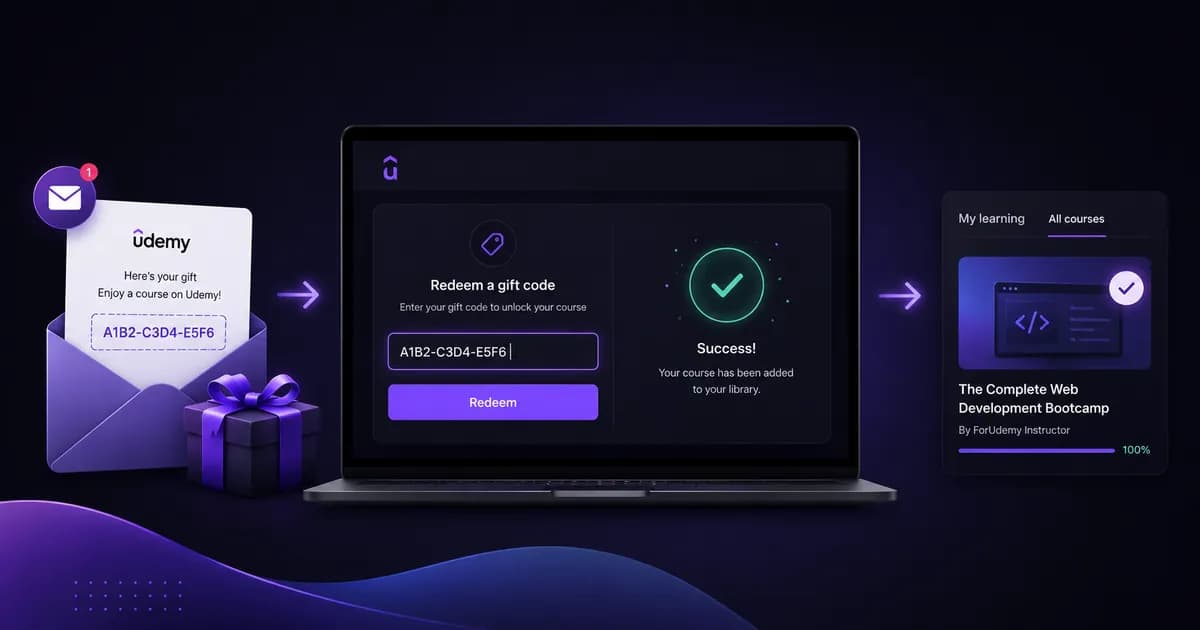
So cryptocurrency reaches a course in two hops: you pay a service, and the service pays Udemy the ordinary way and sends the course as a gift. That is how ForUdemy works, with cryptocurrency one of several options at the payment step; the others are compared in every payment method that works from Russia.
How to pay for Udemy with crypto, step by step
The order of operations:
- Paste the course link into the form on the homepage. The service checks it and shows the price in dollars.
- Sign in or register. Buying needs a ForUdemy account; registering takes under a minute.
- Fill in the first step of the buy form: "Udemy Username" — who the course is for, "Email for the coupon" — where the key is sent, and "Promo code (optional)" if you have one.
- Pick the payment method on the second step — "Cryptocurrency". Crypto is chosen right at the end, not at the start.
- Tick the box and press pay. Above the button sits a checkbox, "I have a suitable Udemy account"; until it is ticked, the button stays disabled. The same tab then opens the payment page, where you pick the coin and the network and see the address, a QR code, the exact amount and a countdown.
- Send the transfer and wait for the network to confirm it. Nothing else is needed: the order status updates by itself, and the key arrives at the email you gave.
Everything after the pay button — the coin, the network, the address, the QR code and the timer — belongs to the payment gateway, not to the service, which knows only the amount of the invoice and how it ended: paid, paid short, or not paid.
One detail sets crypto apart from a card or SBP payment. The invoice is raised in dollars, and the price on the site is in dollars too — that is the figure your transfer is measured against. Card and SBP payments are converted into rubles along the way; crypto is not.
An hour to send: how the payment window works
An invoice is live for 60 minutes. That is not a formality but the working constraint everything else is built around.
While the hour runs and the order is waiting to be paid, the order history carries a link back to the payment page — close the tab by accident and the invoice is not lost. When the hour runs out the link disappears, deliberately: a button that cannot work is worse than no button.
No fresh invoice is issued for the same order — two live payment links for one order could be paid twice, and that state does not exist here. Once the hour is up, the only route is a new order. For a while the old one may still read as awaiting payment though it can no longer be paid, before being marked unsuccessful.
A note on wording: an expired crypto invoice comes back from the payment system as a decline, so the order may show as a declined payment rather than an expired one. If you never sent anything, no money moved. If you did, read the next section.
Mistakes that stop a crypto payment from arriving
A crypto transfer cannot be reversed by anyone once it is sent. Three scenarios are worth knowing in advance.
The transfer went out on the wrong network
Popular coins live on several networks, and an address on one is not an address on another, however alike they look. The payment page names both the coin and the network — send on exactly those. A transfer on a different network never reaches the invoice, and crypto payments have no automatic refund.
The rule is simple: copy the network off the payment page right before you send, rather than from memory in your wallet.
Less arrived than the invoice asked for
The most galling of the three. Plenty of wallets and exchanges take the withdrawal fee out of the amount being sent, so less lands than the invoice asked for.
What happens next matters: the money is received and recorded, but the order is neither fulfilled nor refunded automatically — a case like that goes to a person. There is no option to pay the difference: a part-paid order does not exist in the system, by design rather than oversight. So work the figure out to land exactly on the invoice amount.
The mirror case: send too much and the order goes through, but the excess does not come back on its own. Rounding up just in case is a bad idea.
The transfer confirmed after the window had closed
A network can confirm more slowly than you counted on, and the window is only an hour. A confirmation that lands after the order has stopped waiting does not bring it back to life — that late, it is no longer picked up.
Only support can help here: the @forudemy_support_bot Telegram bot or info@forudemy.com. Have the transaction hash, the amount and the time of the transfer ready — the hash identifies a payment unambiguously. And next time, send the transfer as soon as the invoice is created.
What to check on the payment page before you send
- Coin and network — exactly the ones on the page, with no "it will probably get there".
- Address — copied in full; after pasting, compare the first and last characters.
- Amount — the figure on the invoice, plus whatever your wallet takes on withdrawal.
- Timer — with very little of the window left, starting again with a new order is safer than a transfer sent in the last minute.
The coins, networks and minimum amounts are set by the payment page, not by the service, and can change without notice. Check the page rather than an article — any article, this one included.
What happens after you pay
From here a crypto payment is no different from a card one: the order goes into the queue, the course is bought on Udemy, and the gift code arrives at the email you gave. That usually takes a couple of minutes, and nine orders in ten close within the hour. The outside limit is in the terms of use — 24 hours; past that, the choice is yours: another activation attempt, or a full refund.
The key is redeemed at udemy.com/gift/redeem: sign in to the right account, paste the code, confirm. The full walkthrough is in how to redeem a Udemy gift code.
And the one condition that does not depend on how you paid: the key only works in a Udemy account that was not created in Russia. Set one up in advance over a VPN; it takes a couple of minutes. The check runs one way only: if Udemy shows you prices in rubles, the account is tied to Russia and the key will not activate in it. Dollars or euros prove nothing — Udemy supports dozens of currencies and falls back to dollars. And check while signed in: signed out, the price can be read off the device rather than the account.
Get the account ready before you pay, not after. The key will wait, but until you have a suitable account there is nowhere to redeem it — and the transfer has already gone.
Frequently asked questions
Can I pay for Udemy in USDT?
The exact list of coins and networks is set by the payment page, and that is the only place to see it: press pay and the page opens with whatever is available right now. The hour starts at that moment — send nothing and the order closes unpaid, and you can place it again. We do not print the list here: it can change, and a transfer in a coin or network the page does not show will not reach the invoice.
Do I need a VPN to pay with cryptocurrency?
No. The VPN is for the Udemy account, not the payment: it has to be created outside Russia and signed into from outside Russia too. Udemy itself advises against a VPN when buying on its own site — several IP addresses in a row lead to authorisation failures, the subject of its Troubleshooting payment failures article.
Will I get my money back if something goes wrong?
There is no automatic refund on crypto payments — not one such order returns the money by itself. Every disputed case is settled by a person, so there is one right move: write to support with the transaction hash, the amount and the time of the transfer. The terms-of-use guarantee is separate: if the key has not arrived within 24 hours, the service will, at your choice, retry the activation or refund in full.
Is a course paid for with crypto any different?
No. The payment method only affects how the money reached the service. The course is bought on Udemy in the ordinary way, arrives as a gift code, and once redeemed stays in your library for good — updates and certificate included.
Conclusion
Cryptocurrency is a working way to buy a course on Udemy, just not on Udemy itself: the platform describes it nowhere as a payment method, and the route runs through a service that pays on your behalf. Technically it is three things — the network the payment page shows, exactly the amount it asks for, and inside the hour.
If you hold no cryptocurrency, the same course can be bought by card or through SBP — the options are compared in how to buy a Udemy course from Russia, and the process is laid out step by step on the how to buy page.
Buy Udemy Courses
Paste a course link → pay by card, crypto, or another supported method → get access in 2 minutes
Check Course Price